
How to Fix Slow Internet: What Actually Works
Buffering wheel spinning, pages that won’t load, downloads that crawl — if you’re dealing with any of that, chances are you’ve already typed “how to fix slow internet” into Google at least once tonight. Here’s the reassuring part: most of the time, a slow connection isn’t some mysterious, unfixable problem. It’s usually one of a handful of specific things, and once you know which one, the fix is often quick.
This guide covers the general troubleshooting steps first, then breaks things down by situation — wireless networks, PCs, gaming, and even the Xbox Series X specifically, since the fix isn’t always identical across devices. By the end, you’ll know exactly how to fix slow internet no matter which of those describes your setup, and — just as importantly — when the problem is bigger than anything you can fix yourself.
Why Your Internet Feels So Slow
A slow connection rarely comes out of nowhere. A few things tend to be responsible, sometimes more than one at a time.
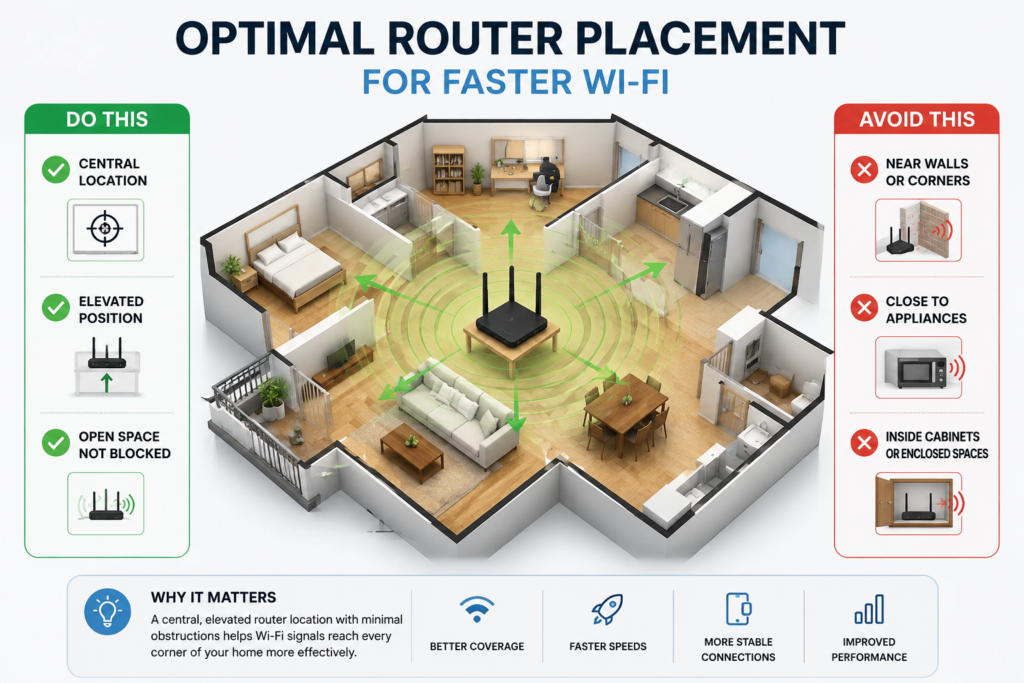
Too many devices fighting for the same bandwidth is probably the most common culprit — every phone, laptop, smart TV, and random smart-home gadget on your network is pulling from the same pool. Router placement matters more than people expect, too; a router tucked in a closet or behind furniture loses a lot of range before the signal even reaches your living room. Then there’s the hardware itself. An older router or modem might simply not be capable of the speeds your plan promises, no matter what you do to it.
Background activity is another sneaky one. Automatic backups, app updates, and streaming services running quietly in the background can eat up more bandwidth than you’d guess. And depending on where you live, plain old network congestion during peak evening hours can slow things down for everyone in your neighborhood at once — that one’s mostly out of your hands. Finally, some providers throttle speeds once you hit a data cap, or your plan just wasn’t built for how many people and devices are actually using it.
Once you’ve got a rough idea of the likely cause, the next step is learning how to fix a slow internet connection for that specific situation — which is what the rest of this is about.
How to Fix Slow Internet: Try These in Order
Here’s how to fix slow internet, step by step, roughly in the order worth trying them.
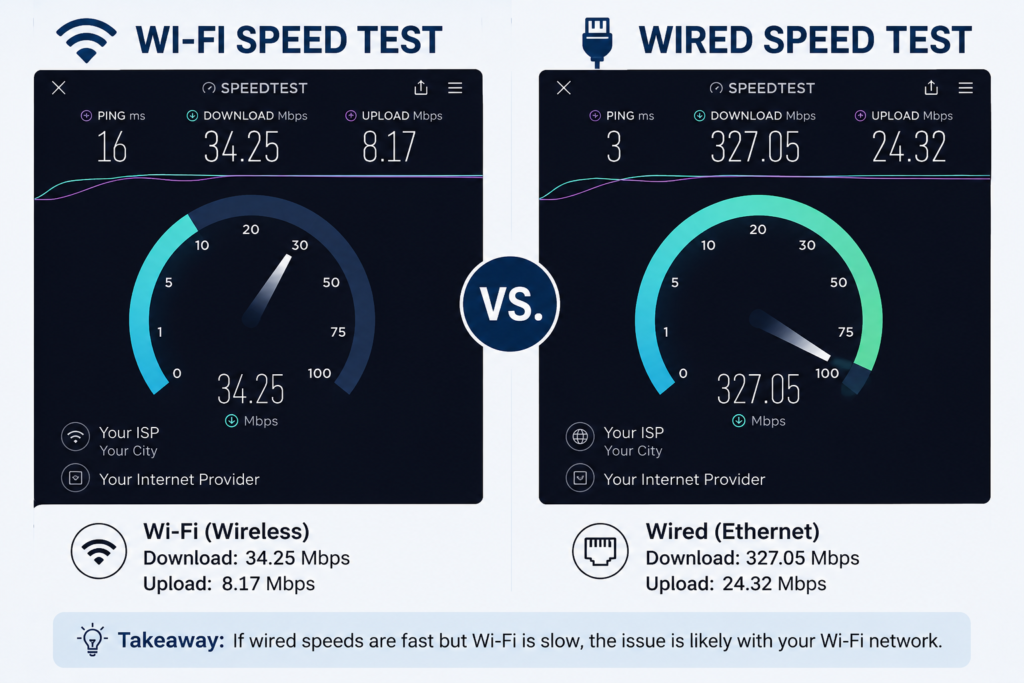
Run a speed test first. Before touching anything, check your actual speed against what you’re paying for. If it’s dramatically lower than advertised, the problem is probably upstream — on your provider’s end — not your home setup.
Restart the router and modem. Yes, it’s the classic “turn it off and on again,” and yes, it works more often than it has any right to. Unplug both, wait half a minute, plug the modem back in, then the router about a minute after that.
Move the router. Elevated, central, and away from walls, metal objects, and the microwave — that’s the ideal spot. This one change alone fixes more slow connections than people assume.
Cut down on connected devices. Disconnect what you’re not using, and while you’re at it, check for any device you don’t recognize. Someone next door piggybacking on your Wi-Fi is more common than you’d think.
Update the router’s firmware. Manufacturers push out updates that patch bugs and squeeze out better performance. Check the admin panel — a lot of newer routers will do this step for you automatically.
Switch Wi-Fi channels or bands. If everyone on your block is crowding the same channel, moving to a quieter one (or hopping onto the 5GHz band) can make an immediate difference.
Pause anything downloading in the background. Cloud backups, game updates, auto-playing videos — pause the lot before you test your speed again, or you won’t get an accurate read.
Run a malware scan. If the slowdown is constant rather than occasional, something running quietly in the background might be to blame.
Call your provider. If none of the above moves the needle, it’s time. There could be an outage, a line issue, or simply a case worth making for a plan upgrade.
How to Fix Slow Wireless Internet
Wi-Fi has its own set of problems, mostly around interference. If it’s specifically the wireless side that’s dragging, a few extra things help.
Most routers broadcast on two bands — 2.4GHz, which reaches farther but is slower and more crowded, and 5GHz, which is faster but doesn’t travel as far. Switching a device to whichever band suits its situation can help more than people expect. In a bigger home, a single router often just can’t cover every room evenly; a mesh system or a simple extender closes those dead zones. It’s also worth checking what’s physically in the way — thick walls, mirrors, and metal furniture all weaken a signal more than you’d guess. One more thing that’s easy to overlook: an unsecured network invites freeloaders, and every extra device quietly eats into your speed.
Between those changes, that covers most of how to fix slow wireless internet without spending a cent on new equipment.
How to Fix Slow Internet on PC
Sometimes it’s not the network at all — it’s the computer. If you’re trying to fix slow internet on a PC specifically, a few things are worth checking that have nothing to do with your router.
Outdated network adapter drivers are a surprisingly common, easy-to-miss cause of poor speeds on Windows machines, so start there. Clearing your DNS cache and browser cache can help too; a cluttered cache slows page loads even when the connection itself is fine. If you can, plug in — an Ethernet cable is almost always faster and more stable than Wi-Fi, no contest. Beyond that, close whatever’s quietly eating bandwidth in the background: cloud sync tools, torrent clients, apps updating themselves without asking. And don’t ignore a pending Windows update; every so often, one of those is the actual cause.
That’s basically how to fix slow internet on PC setups without installing anything extra or booking a technician.
How to Fix Slow Internet for Gaming
For gamers, raw speed isn’t the whole story — latency, or ping, matters just as much, sometimes more. If fixing your connection specifically for matches and lag spikes is the goal, here’s where to focus.
Wire it if you possibly can. A wired connection cuts lag far more reliably than Wi-Fi ever will. Close anything downloading or streaming elsewhere on the network — a game update or a roommate’s video call can spike your ping mid-match without warning. If your router supports it, turn on Quality of Service settings so gaming traffic gets priority over everything else. And when you’ve got a choice of servers, pick the closest one; the distance really does show up in your ping.
Get those four things right and you’ve solved how to fix slow internet for gaming in most cases, no new hardware required.
How to Fix Slow Internet on Xbox Series X
Console players have a couple of extra tricks available. To fix slow internet on an Xbox Series X:
- Skip Wi-Fi and connect the console straight to the router with an Ethernet cable.
- Run the built-in network test under Settings to check both speed and NAT type.
- Restart the console and the router together, then test again.
- Check for a pending console update — some connectivity bugs get patched quietly.
- If your NAT type shows “Strict,” dig into your router’s NAT or port-forwarding settings. It won’t necessarily affect your download speed, but it can wreck multiplayer.
Mistakes That Make Things Worse
A few habits sneak in and undo whatever progress you’ve made.
Hiding the router in a cabinet to keep things tidy is one — it looks nicer, but enclosed spaces and metal doors block a lot of signal. Ignoring firmware updates for months at a stretch is another; bugs that could’ve been patched just sit there. Running the same speed test five times in a row doesn’t help either — some networks briefly throttle results when they’re hit too often, which just muddies the picture. And probably the biggest one: assuming a plan upgrade is the answer before you’ve actually tried learning how to fix a slow internet connection with the basics. A restart, better placement, an updated driver — half the time that’s genuinely all it takes, and it’s free.
When It’s Actually Time to Upgrade
If you’ve worked through everything above and speeds are still disappointing, the plan or the hardware itself might just be the ceiling. A connection that handled one or two devices fine a few years back can buckle under a household now running several streaming services, smart devices, and video calls at once. Take an honest look at your plan’s advertised speed against how your household actually uses the internet day to day, and consider whether a newer router — one that supports Wi-Fi 6, ideally — would make a real difference.
Questions People Actually Ask
What’s the fastest fix for slow internet? Restart the modem and router, then run a speed test. It sounds too simple, but it resolves a huge share of temporary slowdowns on its own.
Why does my internet only slow down at night? Peak-hour congestion. Everyone in your area is online at once, and shared infrastructure feels it. It’s common with cable internet specifically, and mostly out of your control — though a wired connection takes the edge off.
Does restarting the router really do anything? More than you’d think. It clears out temporary memory issues and refreshes the connection to your ISP, which on its own is often enough to bring speeds back to normal.
Could old cables actually be the problem? Genuinely, yes. Aging Ethernet cables, an outdated modem, or a router that can’t keep up with your plan’s top speed can all create a bottleneck — even when the plan itself is fast.
How do I know if it’s my Wi-Fi or my actual plan? Run a speed test wired, straight into the router, then run the same test over Wi-Fi. A big gap between the two points to your wireless setup, not your plan.
What should I do differently for streaming or video calls? Wire the device if you can, or make sure it’s on 5GHz. Close anything else hogging bandwidth in the background, and if buffering keeps happening during peak hours, dropping the video quality a notch usually solves it.
The Bottom Line
Slow internet is annoying, but it’s almost never a mystery. Between a quick restart, better router placement, a firmware check, and the device-specific tweaks above, you now know how to fix slow internet in pretty much any situation — home network, PC, gaming setup, or console. If you’ve genuinely tried all of it and things are still slow, that’s your cue to stop troubleshooting and just call your provider.