
What Practices Are Beneficial for Training AI Models With Prompts?
Getting good results from an AI model rarely comes down to luck. It comes down to how the prompt is built. The practices that are most beneficial for training AI models with prompts include giving specific instructions instead of vague ones, showing the model examples of what you want, asking it to reason step by step for complex tasks, and testing your prompts against real cases instead of trusting the first output. None of this requires touching the model’s underlying code — it’s about how you communicate with a model that’s already trained and capable, but needs clear direction to perform consistently.
This distinction matters because “training an AI model” means two very different things depending on context. Below, we’ll walk through exactly which prompting practices move the needle, how to apply them, and how to build your own repeatable process — whether you’re shaping a single chatbot response or setting up a workflow your whole team will reuse.
What “Training AI Models With Prompts” Actually Means
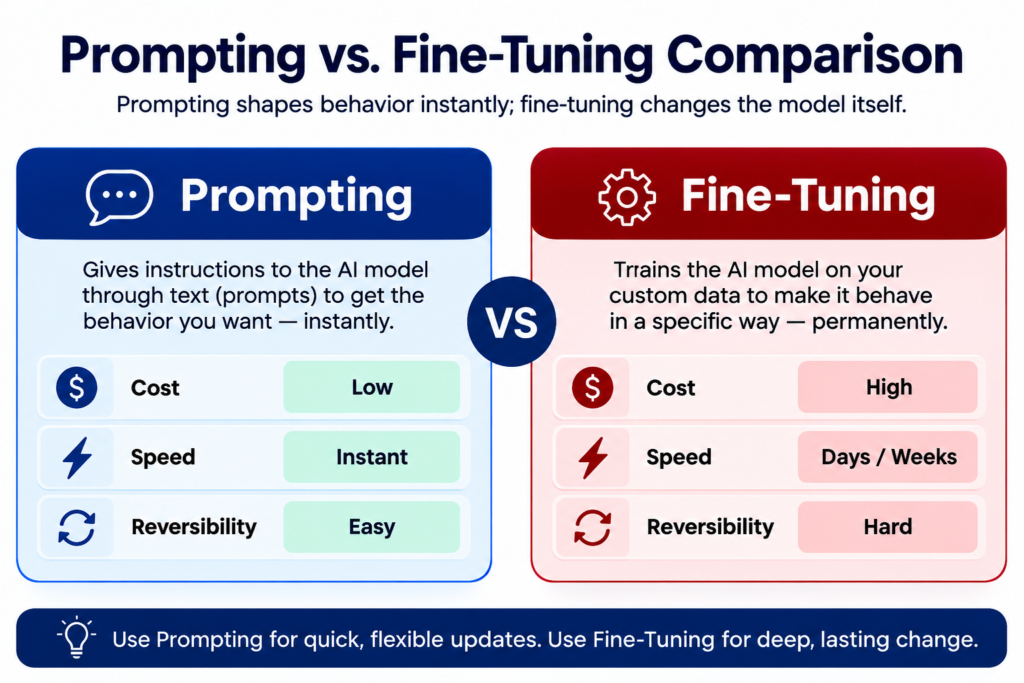
It helps to separate two ideas that often get blurred together. Actual model training — including fine-tuning — changes a model’s internal weights using large sets of labeled data. It’s slow, resource-intensive, and usually unnecessary unless you’re solving a highly specialized, high-volume problem.
Training an AI model with prompts is different. You’re not changing the model itself — you’re shaping its behavior through the instructions, examples, and structure you provide each time you interact with it. Think of it as the difference between rewiring someone’s brain and simply giving them a clear, well-organized brief. Prompting is fast, free beyond normal usage, fully reversible, and — when done well — gets you most of the way to the output quality fine-tuning would deliver, without the cost or complexity.
For nearly every everyday use case, prompting is where you should start.
8 Practices That Are Genuinely Beneficial for Training AI Models With Prompts
Start Specific With Zero-Shot Prompts
A zero-shot prompt gives the model a task with no examples attached, relying purely on clear instructions. Modern models handle this well — but only if the instruction is precise. “Make this better” gives the model nothing to work with. “Shorten this by 30%, keep a friendly tone, and preserve every factual detail” gives it a job it can actually complete.
Before reaching for more advanced techniques, make sure your basic instruction is unambiguous. Vague prompts are the single most common reason people conclude “the AI doesn’t understand what I want,” when the real issue is the instruction itself.
Use Few-Shot Examples to Show the Pattern
Few-shot prompting means showing the model two to five examples of the input and output you want before asking it to handle a new case. This works because the model pattern-matches your examples rather than guessing your preferences from scratch.
Quality beats quantity here. Three well-chosen, varied examples will consistently outperform ten repetitive ones — variety teaches the model the underlying principle instead of a narrow surface pattern.
Add Chain-of-Thought for Multi-Step Tasks
For anything involving reasoning, math, or multi-step decisions, ask the model to think through the problem step by step before answering. This simple instruction — sometimes as short as “let’s think through this step by step” — noticeably improves accuracy on complex tasks because it forces the model to work through intermediate logic instead of jumping straight to a guess.
For production or repeatable use cases, it helps to lay out the exact steps you want followed (identify factors, weigh options, flag risks, then conclude) rather than leaving the reasoning path open-ended.
Assign a Role or Persona
Telling the model who it should “be” — a financial analyst, a customer support agent, a technical writer — shapes its vocabulary, depth, and point of view. This works because it activates the relevant knowledge and tone patterns the model already has, rather than teaching it anything new.
Persona prompting is especially useful when the same information needs to be explained differently to different audiences — a technical explanation for an engineer reads nothing like the same concept explained to a non-technical stakeholder.
Structure Prompts Into Clear Sections
As tasks get more complex, unstructured paragraph prompts start to break down. Splitting a prompt into clearly labeled sections — task, context, constraints, and desired format — helps the model parse exactly what’s being asked and reduces the chance it misses part of your instruction.
A simple structure to reuse:
Task: What you want done and what success looks like
Context: Background information and audience
Constraints: Length limits, tone, things to avoid
Format: Bullet points, table, headings, JSON, etc.
This structure alone resolves a large share of inconsistent-output problems.
Ground Answers With Source Material
When factual accuracy matters, don’t rely on the model’s memory alone — give it the actual source material and instruct it to use only that information. This approach, often called retrieval-augmented generation (RAG) in technical contexts, dramatically reduces the risk of confident-sounding but incorrect answers.
A simple version of this: paste the relevant document excerpt into your prompt and add an instruction like “answer using only the information provided below, and say so explicitly if the answer isn’t there.” That one line does a lot of work.
Add Explicit Constraints
Constraint prompting means spelling out what the model must and must not do. This matters most in situations where the output needs to be safe, on-brand, or policy-compliant — customer support, legal-adjacent content, medical-adjacent content, financial guidance.
Explicit constraints (don’t guarantee outcomes, don’t reference internal systems, don’t repeat the apology) catch failure modes before they happen, rather than requiring you to review and correct every output after the fact.
Test, Evaluate, and Refine
The most valuable practice isn’t any single technique — it’s treating prompting as a system you improve over time rather than a one-off task. Keep a small set of representative test cases, including tricky or ambiguous ones. Run any new or revised prompt against that same set before trusting it. Note what changed and whether it actually helped.
This is what separates people who get lucky with a good prompt occasionally from people who get reliable results consistently.
How to Train Your Own AI Model With Prompts: A Simple Workflow
If you’re starting from scratch and want a repeatable process for training your own AI model through prompting rather than fine-tuning, this sequence works well for most tasks:
Define the task and success criteria clearly. What does a “good” output actually look like? Write it down before you write the prompt.
Write a zero-shot version first. Test whether clear instructions alone get you close.
Add two to three few-shot examples if the output format or tone still isn’t landing.
Add chain-of-thought instructions if the task involves any reasoning or multiple steps.
Add constraints for anything safety-, brand-, or accuracy-sensitive.
Test on 5–10 varied real inputs, not just your original example.
Refine based on failures, and save the working version somewhere you’ll reuse it.
This is genuinely custom AI model training in the sense that matters for most people — a repeatable, tailored process — without the cost or complexity of retraining a model’s weights.
Prompting vs. Fine-Tuning: Which Do You Actually Need?
Most tasks never need fine-tuning. Prompting gets you there faster, cheaper, and with more flexibility to adjust on the fly. Consider fine-tuning only when:
The task is stable, high-volume, and business-critical
You have a substantial set of high-quality labeled examples to train on
Prompting has already proven the task is viable but prompt length or complexity is becoming a genuine cost or reliability problem at scale
In practice, custom AI model training through prompting should always come first — it tells you whether the task is even well-defined before you invest in anything heavier.
Common Mistakes That Undermine Prompt-Based Training
Vague instructions. “Summarize this” or “make it better” leaves the model guessing at your preferences.
No format specified. If you don’t say what shape you want the output in, the model picks one for you — and it may not match what you need.
One giant prompt for a complex task. Breaking a task into smaller, sequential prompts usually beats one prompt trying to do everything.
Testing on a single example. A prompt that worked once isn’t proven — it might just be a lucky case.
Examples that are too similar. Narrow, repetitive few-shot examples teach a narrow pattern instead of the underlying principle.
Frequently Asked Questions
What’s the difference between training an AI model and training it with prompts? Actual model training changes the model’s internal weights using large datasets — this is fine-tuning. Training a model “with prompts” doesn’t change the model at all; it shapes behavior through the instructions and examples you give it each time.
How do I train an AI model without coding experience? You don’t need to code to train an AI model through prompting. Clear instructions, a few examples, and testing your prompt against different inputs is enough for the vast majority of everyday tasks.
Do I need fine-tuning to get consistent AI outputs? Usually not. Structured, well-tested prompts get most people to consistent, reliable outputs. Fine-tuning is worth considering only for large-scale, highly specialized, business-critical use cases.
What’s the single biggest mistake people make when training AI models with prompts? Being vague. Instructions like “make it better” or “fix this” don’t give the model anything concrete to act on — specificity is what makes a prompt actually work.
Final Thoughts
The practices that are genuinely beneficial for training AI models with prompts aren’t complicated tricks — they’re the same fundamentals that make any instruction clear: be specific, show examples, break down reasoning, ground answers in real information, and test before you trust. Start simple, add techniques only when a simpler approach falls short, and treat your prompts as something you refine over time rather than get right once. That habit, more than any single technique, is what actually improves your results.